EXPORT & PRINT
How to print a receipt PDF
Choose the document size before you export, then match it in your PDF viewer and printer settings. ReceiptLab creates the PDF; printing happens through the software and printer on your device.
1. Choose 58 mm, 80 mm or A4
Open Appearance and choose the paper size. Use the preview to inspect long item names, the business heading and notes. A4 is useful for roomy service or hotel documents; narrow widths produce receipt-style slips.
The receipt paper-size comparison explains the differences. For a worked A4 document, open the hotel stay example.
2. Download a PDF document
Select Download, choose PDF document and check the paper size shown in the download dialog. The export size determines the PDF page dimensions; review this even if you already chose a size in Appearance.
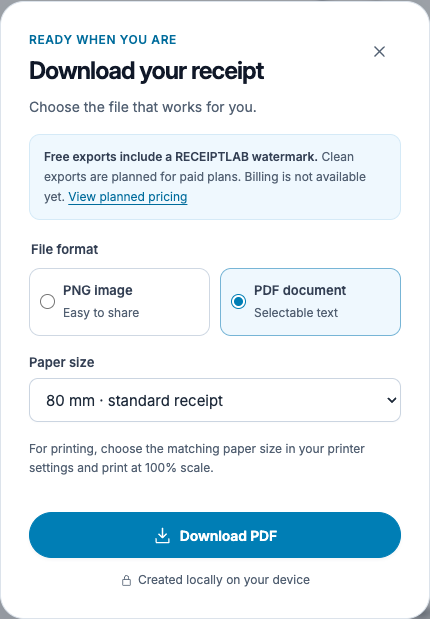
Download the PDF and open it in a PDF viewer. The text is selectable, and long receipts can continue over multiple pages. Free downloads include a watermark.
3. Match the print settings to the file
Choose the intended printer and paper. When printing at the document's original dimensions, select the setting your viewer labels Actual size or 100%, and inspect the print preview. Automatic fit or shrink options can change the receipt's scale.
If your printer does not support the selected paper width or page length, use a supported format and check the preview again. A narrow PDF printed on A4 will not automatically become a roll-printer receipt. Printer drivers, printable margins and supported paper lengths differ.
The sample PDFs are generated by the real ReceiptLab exporter. Physical printer compatibility has not been tested. Check your printer documentation and print a sample before a larger batch.
Why is the right edge cut off?
Check the selected paper, printable margins and scaling. If the printer cannot accommodate the document width, choose a suitable format or scaling setting and inspect the result before printing.
Why did a long receipt use more than one page?
The PDF exporter paginates long receipts. Check all pages, including the final total and notes. Shorten unnecessary text or choose a roomier format if that better suits the document.