Receipt details
Itemized receipt example: every field explained
An itemized receipt breaks a purchase into separate products or services so the reader can see how the total was reached. A useful line identifies the item, its quantity, the price per unit and the resulting amount.
Read this itemized receipt from top to bottom
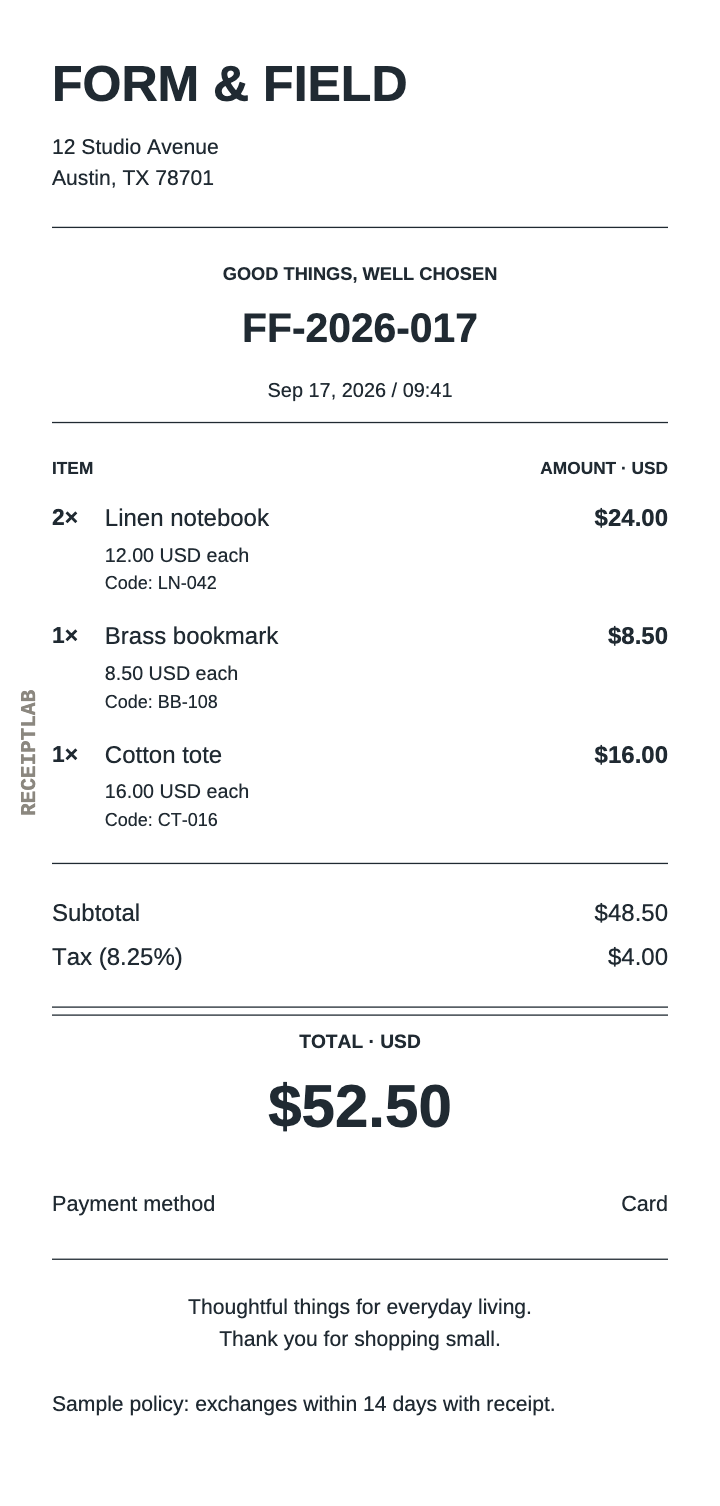
This fictional Form & Field sale has three different products and four units in all. Each numbered explanation below corresponds to a part of the receipt, in reading order.
- 1. Business heading
- FORM & FIELD identifies the seller. The address underneath gives context. Enter your own name and contact details in Business & logo.
- 2. Receipt reference and date
- FF-2026-017 identifies this receipt in the example records. The date and time distinguish when the sale happened. Edit them in Receipt details; references are manual.
- 3. Item lines
- Each product has a description, quantity, unit price and calculated amount. The notebook code LN-042 is an optional product reference, separate from the receipt number.
- 4. Amount summary
- The subtotal adds the item amounts. Tax is listed separately. The final total is the amount of the sale, including any discount, tax and tip entered in the editor.
- 5. Payment summary
- This example records Card. In ReceiptLab that means the total is recorded as paid, without processing or verifying the payment.
- 6. Additional note
- A short relevant note can explain a collection detail or your own policy. Replace template wording with information that applies to your sale.
A unit price is not the whole line amount
For two notebooks costing $12.00 each, enter quantity 2 and unit price 12.00. The editor calculates $24.00. Entering 24.00 as the unit price would make the two-notebook line $48.00.
| Item and code | Quantity × unit price | Line amount |
|---|---|---|
| Linen notebook · LN-042 | 2 × $12.00 | $24.00 |
| Brass bookmark · BB-108 | 1 × $8.50 | $8.50 |
| Cotton tote · CT-016 | 1 × $16.00 | $16.00 |
| Subtotal | $24.00 + $8.50 + $16.00 | $48.50 |
| Illustrative tax | 8.25% × $48.50, rounded | $4.00 |
| Total | $48.50 + $4.00 | $52.50 |
The subtotal excludes tax and tip. The final total includes the adjustments. ReceiptLab applies one tax rate to the discounted subtotal and adds a fixed tip afterward; it does not set individual tax treatments for each line. See the calculation and rounding guide for the complete order.
Write descriptions that explain the charge
Use a recognizable product or service name. Add size, duration or another detail when it distinguishes the charge. Keep a product code in Item code → SKU / item code instead of asking the reader to identify a purchase from its code alone.
For service work, separate labor and materials. A line such as Repair labor / hour with quantity 2.5 and unit price 80.00 gives a $200.00 labor amount. Put the parts on their own rows. The unit belongs in the description because the quantity field is numeric.
Quantities support up to three decimal places and unit prices up to two. The editor supports 1–40 item rows. Choose the retail template for product codes or the service template for labor and materials.
Check the complete receipt
- Make the seller, date and manual reference identifiable.
- Check every quantity and the price of one unit, then compare the line amounts with the subtotal.
- Make the payment summary match what actually happened. A cash balance due is still unpaid.
- Remove unrelated sample notes and inspect wrapping at your chosen paper size.
The editor requires a business name, receipt number, valid date and complete item data for export. That validation does not establish whether a receipt meets a particular employer’s reimbursement policy or other recipient requirements. Include the information your recipient needs.
Free PNG and PDF downloads include the ReceiptLab watermark, as these examples show. Paid exports without the watermark are planned; checkout is not available yet.