 Illustrative sample · fully editable
Retail · PNG & PDF
Sephora Receipt Generator
Create an independent Sephora-style receipt sample. Customize the illustrative details, preview your changes and download a watermarked PDF or PNG.
Customize Sephora receipt →No signup. Free exports include a watermark.
Independent sample templates. ReceiptLab is not affiliated with or endorsed by these retailers. Purchases and store details are illustrative.
Paper options58 mm · 80 mm · A4
MAKE IT YOURS
What you can edit in this Sephora receipt
- Department and Order fields you can edit
- Editable item codes alongside product descriptions
- A matching sample with calculated totals and editable items
- Your logo, date and receipt reference
- Paper width, typography and receipt sections
- PNG and PDF from the same preview
Keep beauty-product sizes and shades identifiable
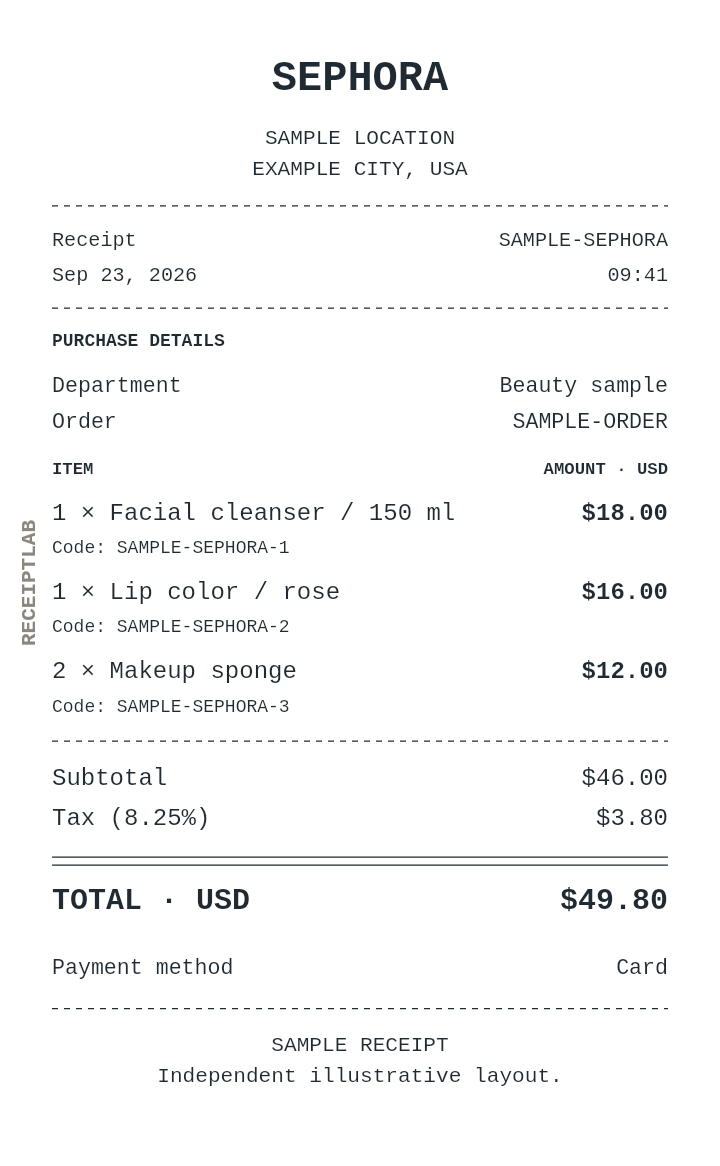
This Sephora-style sample contains a 150 ml cleanser, rose lip color and two makeup sponges. Product sizes and shades belong in the description; quantity counts the number of those products. The two sponges at $6.00 each form a $12.00 line.
Use different rows for shades or pack sizes you need to distinguish. A pack sold at one price should be described as a complete pack and counted as one unit. Sample product codes remain separate editable labels and do not retrieve product information.
The starting subtotal is $46.00, with $3.80 of illustrative tax and a $49.80 total. The example does not calculate loyalty points, store discounts or item-specific taxes. Review every price and description before exporting your layout.
A REAL STARTING POINT
Sephora receipt example
Review the fictional sample, then edit the details for your own document.
| Item | Quantity | Unit price | Amount |
|---|---|---|---|
| Facial cleanser / 150 ml | 1 | 18.00 | $18.00 |
| Lip color / rose | 1 | 16.00 | $16.00 |
| Makeup sponge | 2 | 6.00 | $12.00 |
| Subtotal | $46.00 | ||
| Illustrative tax (8.25%) | $3.80 | ||
| Total | $49.80 | ||
Illustrative 2026-09-23 transaction. Tax is a sample rate. Downloads include a watermark.
FROM TEMPLATE TO DOWNLOAD
How to make a Sephora receipt
Open the matching template
Select Customize Sephora receipt above. In Business & logo, update the heading, address and logo. Set the date and reference in Receipt details.
Prepare your Sephora receipt
Include shade or bottle size where it identifies the product. Keep sample product codes separate from the editable descriptions.
Check and download
Review every line and the payment total. Select Download, choose your paper size and PNG or PDF, then download the watermarked file. Save an editable draft if you want to return later.
UNDERSTAND THE FORMAT
Reading this receipt
The Department, Order fields provide context for this example. These text fields are entered separately from the quantities and prices that calculate the amount.
Product codes identify individual lines. They are editable labels and do not look up prices or stock.
A useful starting tip
Include shade or bottle size where it identifies the product. Keep sample product codes separate from the editable descriptions.
GOOD TO KNOW
Sephora receipt questions
Is this an official Sephora receipt?
No. This is an independently created, editable layout sample. It is not issued or verified by Sephora, and ReceiptLab is not affiliated with the company.
Can I list two shades of the same product separately?
Yes. Create a separate item row for each shade, with its own description, quantity and unit price. This keeps the itemized sample readable even when prices match. No retailer catalogue or customer account is connected.
Which file formats can I download?
Download a PNG image or a PDF with selectable text. Both use the same receipt data and include a watermark on the free plan.
Can I change the paper size?
Choose 58 mm, 80 mm or A4 in Appearance. Preview long descriptions at the size you intend to use, and match your printer settings when printing.
Can I save this receipt and edit it later?
Use Save draft to download an editable file to your device. Open draft restores that file. ReceiptLab does not automatically save your work.
Explore all retail receipt templates →
Related receipt templates
Browse the collection →
Your Sephora receipt starts here.
Customize Sephora receipt →No signup. Edit on your device.